Walter asked us to post this on his behalf, because he has no hands. He's a wedge after all. Anyway, he bought some satellite laser box or something and is jumping up and down about it. Here y'go.
WALTER TALKS GPS MODDING

A week or two ago I was in the local Wedgeland Canadian Tire (yes, they have Canadian Tire in Wedgeland) and saw a
GPS for $49.99. I thought this was neat, because I like shiny things with buttons. Turns out several other people like cheap neat things, too, as evidenced in this
thread on
Red Flag Deals. The GPS has old map data and a clumsy interface, but isn't too shabby as far as hardware is concerned: 372MHz ARM processor, 64MB ram, 2GB built-in flash with an SD-slot. Not bad for $49!
Very quickly, some smart kids found that this GPS was very easy to hack. Within minutes, by changing a single line in a text Editor, you can get to a Windows CE (Core 5.0, bleh) shell and start installing other stuff. Neat!
I won't go into detail on how to hack the unit, it's been covered in the aforementioned thread, and summarized in a recently created
wiki. Stick to the Wiki, at 2700+ posts, the Red Flag Deals thread's signal to noise ratio is a bit low.
The first thing I did was to install BBMenu, an alternative menu system to replace the clunky Curtis software. It comes with a bunch of stuff like:
- Core Player, for playing divx and other video formats
- An EBook Reader
- An MP3 Player
- A bunch of games (Sudoku, guys, SUDOKU)
- Shortcuts to the Windows CE command/line
Also, it kind of makes the UI look like an iPhone. Is that still cool? I'm new, it's still cool to me. And for those who want to try out alternative GPS software, it has icons ready to be pointed at Tomtom, Garmin, and iGo navigation software, all of which reportedly work on the GPD359. Just remember to buy legitimate copies, kids! BBMenu installation help is on the wiki as well.

What I'm working on right now is getting some more intense gaming action out of this thing. I'd like to get a NES or SNES emulator running, ultimately. My old first generation Compaq iPaq (Pocket PC) could run a NES emulator, and this has twice as much RAM as it did. But, I thought, before trying that out I should go for something a little less intensive. I thought ScummVM would be a good choice as it's been ported to EVERYTHING. Here's a brief walkthrough on the steps to get it running on your GPD359:
0) "Unlock" your GPD359 following the instructions on the aforementioned wiki.
1) Download ScummVM for Windows CE:
http://prdownloads.sourceforge.net/scummvm/scummvm-0.13.0-WinCE.zip?download2) Unpack and copy the ScummVM folder to somewhere on the GPS (/ResidentFlash/ScummVM/ or /SDMMC/ScummVM/) are good bets. ScummVM will fit in the resident flash memory but you may max it out if you install more than a couple games. You must have Windows Mobile Device Center installed to copy to your device, but you already installed it as part of the instructions to unlock your device, right? If you have a separate SD card reader, by all means use it instead. ActiveSync is dog slow (assuming a relatively slow dog, where a dedicated card reader would be a middle-of-the-road Greyhound).
3) Download GAPI. GAPIS is the "Game API" library, written by Microsoft and subsequently abandoned. Some nice, probably European people have written a free clone (Save this somewhere on your PC):
http://www.wincesoft.de/GAPI_for_HPCs_v403_with_Apps.CAB4) .CAB files are the Windows CE equivalent of .MSI installer files on Windows XP/Vista. Using Windows Mobile Device Center (aka. ActiveSync), copy the file anywhere your devices (ResidentFlash/ or SDMMC/, perhaps).
5) Load Windows Explorer on the GPS (if using BBMenu, there is an icon to load Windows in the apps subscreen). Find the .CAB file on your device and double-click it. It will install GAPI and the .CAB file will magically disappear. Don't despair!
6) With GAPI installed, you need set it to emulation mode. Unfortunately, no native GAPI configuration [yet] exists for the GPD359. In Windows Explorer on the GPS, click your way to \Windows\ and find the GAPI executable. Double-click it to load the options dialog.
7) Select the 'Emulator' tab, check "Use GAPI emulator'. Ensure Emulated Display size set to 320 x 240 (Native).
8) Go back to the ScummVM folder you copied over to the GPS earlier and click ScummVM1 or ScummVM2 (older games use ScummVM1, newer ones ScummVM2). You may need to go through the GAPI dialog once more, after which, you're presented with the ScummVM main menu!
So here's the rub. I can't yet figure out how to make the GAPI installation "stick". Every time the device is shut off, everything non-stock (including GAPI) is purged from the \Windows\ folder on the internal flash memory. Anyone gotten around that? Please post in the comments!
Other than that hitch, it's Scumm time! I'm off to play some Maniac Mansion. Or Monkey Island. Ooh, or Kings Quest 5! Did you know all the old Sierra games run on ScummVM? Amazing!!
Next task: Get PocketNES or similar running and beat Final Fantasy with 4 white mages. It has happened before and it will happen again!
PS: RIP Battlestar. My sadness is tempered only by GPS fiddling.


 follow Brie on Twitter
 follow Walter on Twitter

 Posts
Posts
 Zarkles are whimsical creatures that are part of the Zarkle family. Each Zarkle has their own unique name, personality, and Zany Pocket Blankie to sleep in. They can also be a comfort at night and help keep all the scary things at bay.


 She's a Wedgetarian! What's a wedgetarian? They only eat wedgetables!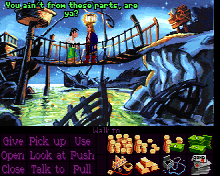

 75 Nassau Street

 We Are Wedges Online Adoption Centre IS NOW OPEN


